> For the complete documentation index, see [llms.txt](https://docs.volary.io/llms.txt). Markdown versions of documentation pages are available by appending `.md` to page URLs; this page is available as [Markdown](https://docs.volary.io/kryptokase/functionalities/create-token.md).
# Create Token
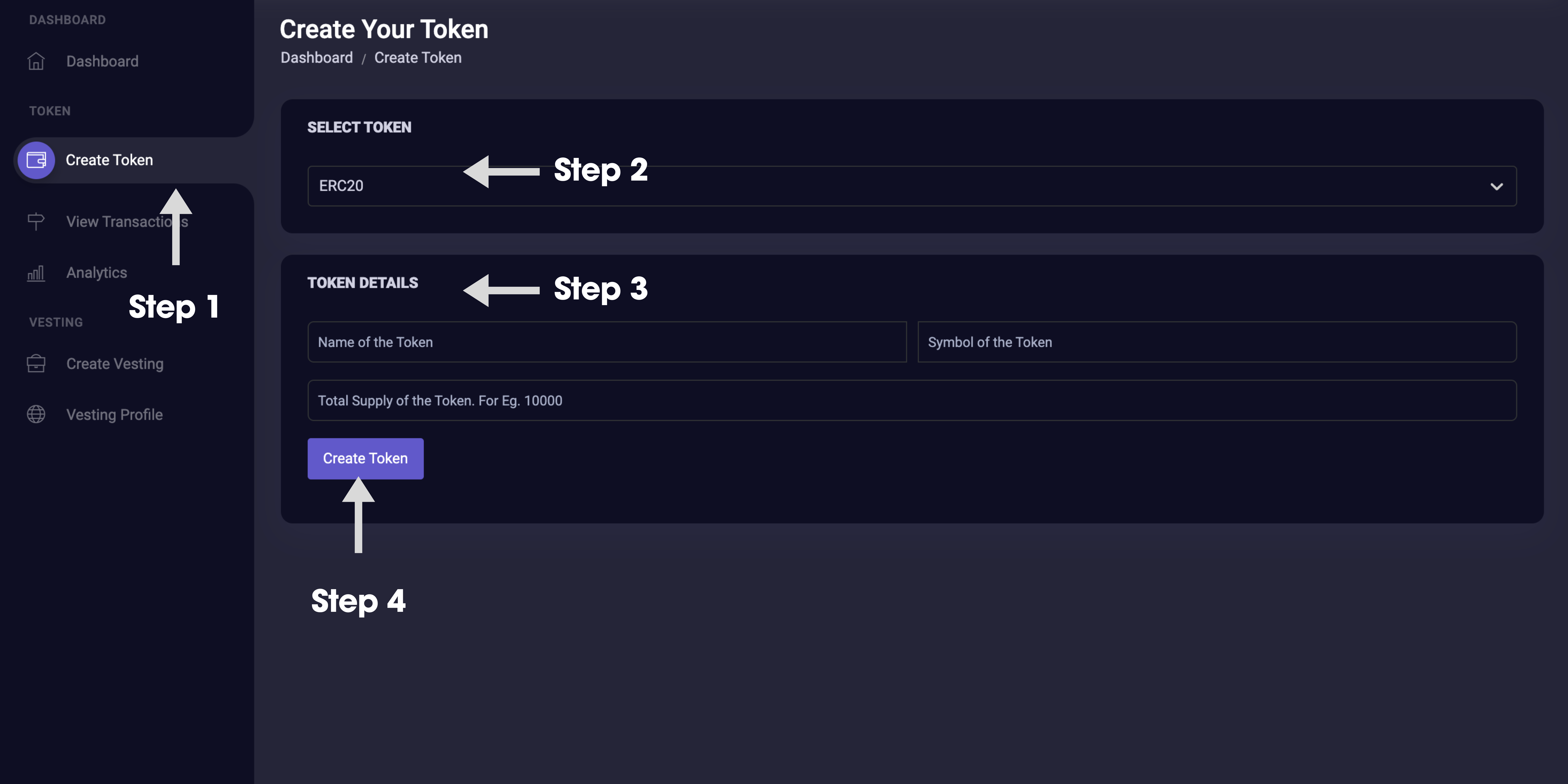
Creating a digital token is the first step for many blockchain projects, whether it's to launch a new cryptocurrency, represent ownership, or facilitate utility within an ecosystem. KryptoKase simplifies this process, allowing users to create ERC20 tokens with ease.
## Overview
Token creation on KryptoKase involves generating a new ERC20 token with specific attributes defined by the user. The ERC20 standard ensures compatibility with the Ethereum ecosystem, making the tokens easily transferable and usable across a wide range of applications and services.
## Steps for Creating an ERC20 Token
### 1. Access Token Creation Section
Log in to your KryptoKase account and navigate to the Token section. Select the option to create a new token.
### 2. Enter Token Details
* **Name**: The name of your token, which will be visible to holders and on token exchanges (e.g., KryptoCoin).
* **Symbol**: A short abbreviation for your token (e.g., KTC). This will be used for trading and identification purposes.
* **Total Supply**: The maximum number of tokens that will be created. This number can affect the token's scarcity and value.
### 3. Review and Deploy
Before finalizing your token creation, review all details carefully. Once you are satisfied, proceed to deploy your token. KryptoKase will generate a smart contract for your token and submit it to the Ethereum blockchain.
### 4. Confirm the Transaction
You will need to confirm the token creation transaction in your connected MetaMask wallet. Ensure you have sufficient ETH for the transaction fee.
### 5. Token Deployment
Once the transaction is confirmed, your token will be deployed on the Ethereum blockchain. KryptoKase will provide you with the contract address, which you can use to view your token on Etherscan and distribute it to others.
## Key Features
* **Customizable Parameters**: Choose your token's name, symbol, and total supply to fit your project's needs.
* **Immediate Deployment**: Tokens are deployed instantly upon confirmation, allowing you to begin using or distributing them without delay.
* **Smart Contract Security**: KryptoKase generates secure and audited smart contract code, minimizing the risk of vulnerabilities.